AI Image EXIF Data: What Metadata Reveals About Synthetic Photos
AI-generated images have transformed the digital landscape. Tools like Midjourney and Stable Diffusion produce stunning art daily. Yet, as these images grow more realistic, questions about authenticity mount. Master how AI tools process EXIF data—it’s your key to privacy protection. Understanding what these files reveal through hidden data is now a vital skill for creators and viewers alike.
How can you tell if an image is real or generated by AI? Visual details often deceive, but hidden metadata usually tells the truth. Whether you are a journalist verifying a source or a digital artist, analyzing background file info is your first step. Skip the guesswork. Verify. You can easily view exif data to see what is hidden inside any image you find online.
This guide explores the world of synthetic photo metadata. Learn how AI tools handle EXIF data, how to spot the "red flags" of AI generation, and why privacy matters when sharing AI art. By following these steps, you will know exactly how to use a metadata analyzer to uncover digital fingerprints left by artificial intelligence.

How AI Image Generators Handle EXIF Data
Real cameras capture granular technical details. Lens type, sensor temperature, even the shutter’s exact millisecond timing—all logged automatically. AI image generators work differently. They are software programs, not hardware devices. Consequently, the metadata they produce is often minimal or strictly structured.
What EXIF Data AI Tools Preserve by Default
Most AI image generators prioritize "clean" output. When a new image renders, the software creates a fresh file with minimal metadata tags. However, some tools leave a distinct trail. For instance, generators may include a "Software" tag identifying the platform, such as Adobe Firefly or a specific Stable Diffusion build.
Watch for prompts hidden in XMP fields (not EXIF). Some AI tools embed these text commands directly into the file. If you analyze your photos using a deep metadata viewer, you might find the exact text used to generate the artwork. These text strings serve as a definitive proof of synthetic origin.
The Metadata Gap Between Camera Photos and AI-Generated Images
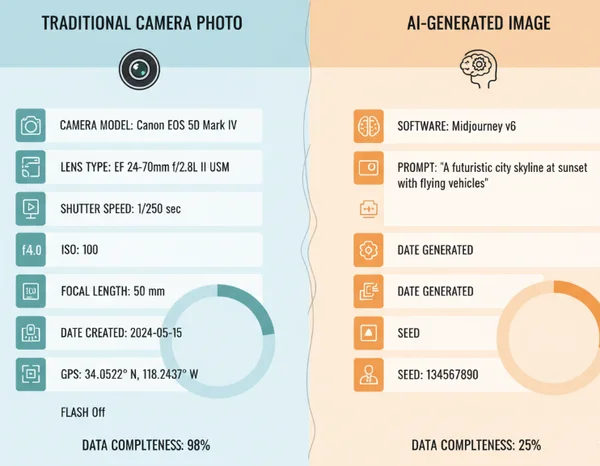
The primary difference between real and synthetic photos is data "completeness." Real photos contain a complex "MakerNote" section. This is a specific part of the EXIF data where manufacturers like Canon, Sony, or Nikon store proprietary info about internal camera settings.
AI-generated images almost never have a MakerNote. They also lack a "Camera Model," "Lens Serial Number," and "Flash Information." When these fields are empty, it strongly suggests the image did not come from a physical camera. If you want to see this gap yourself, check image details on any file to see which fields are missing.
Case Study: Stable Diffusion vs Midjourney Metadata Patterns
Different AI platforms leave unique fingerprints. Stable Diffusion, especially when run locally via Automatic1111, often saves the entire generation parameter set into the image's PNG metadata. This includes the seed number, sampler, and CFG scale. This transparency makes it easy to identify and even recreate the image exactly.
Midjourney is much more restrictive. When you download an image from Discord, the platform typically strips away most technical data to minimize file size. However, the file structure—such as the specific way the color profile is embedded—can still hint at its origins. Identifying these subtle patterns is much easier when you use a dedicated online exif reader.
Detecting AI-Generated Images Through EXIF Analysis
As AI improves at mimicking reality, visual clues like "six-fingered hands" are disappearing. Technical analysis is now essential. By inspecting the metadata, you can find proof of an image's origin that the naked eye would miss.
Key Red Flags in EXIF Data That Suggest AI Origin
When determining if a photo is synthetic, look for these specific red flags:
-
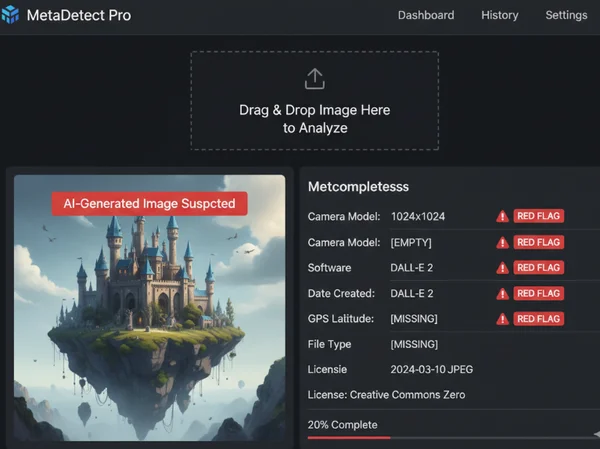
Missing Hardware Data: No camera make, model, or lens information present.
-
Generic Software Tags: Presence of names like "DALL-E," "Stable Diffusion," or "Canvas."
-
Perfect Timestamps: AI images often have creation dates that don't match the "Date Modified" or show creation times exactly on the hour.
-
Lack of GPS: Real photos often lack GPS for privacy, but synthetic images never have authentic GPS coordinates unless someone fakes them manually.
-
Unusual Color Profiles: Some generators use specific sRGB profiles that differ from the industry standards used by modern smartphones and DSLRs.
Using EXIFData.org to Verify Image Authenticity
The best way to perform this analysis is with a tool that displays every hidden tag. We provide a platform where you can test your images instantly. Our tool prioritizes your privacy; images are processed directly in your browser. Your data never leaves your device—no leaks, no risks.
To verify an image, simply drag and drop the file onto our homepage. You will see a structured list of EXIF, IPTC, and XMP data. If a "Prompt" field or a "Software" tag mentions an AI model, you have your answer. Even if the data is mostly empty, that "emptiness" provides key evidence for your investigation.
Limitations of EXIF Analysis in AI Detection
Metadata is powerful but not foolproof. A user can easily "strip" metadata from an AI image using a simple script or editor. Once gone, the file looks like a blank slate. Furthermore, social media platforms like Facebook and Instagram automatically remove most metadata during upload.
In these cases, you cannot rely solely on EXIF data. However, if the metadata is present, it provides the most concrete evidence available. Always examine metadata as your first step, but keep an open mind if the fields have been intentionally cleared by the uploader.
Privacy Implications of AI Image Metadata
Privacy is a two-way street. While you might use metadata to investigate others, be aware of what your own AI-generated images say about you. Many creators do not realize their "private" AI art might contain identifying information.
What Personal Information Might Be Embedded in AI Images
Some AI platforms embed account IDs or usernames into image metadata. If you share these on a public forum, someone could potentially trace the image back to your specific account. Additionally, if you use AI to "enhance" or "edit" a real photo, the original GPS location and camera serial number might remain hidden in the background.
How to Protect Your Privacy When Creating AI Art
Before sharing AI creations online, remove exif data to ensure no personal footprints remain. This is vital if you are working on sensitive projects or wish to remain anonymous.
Protecting your privacy is straightforward. Use our tool to see what is currently inside your file. If you see your name, account ID, or location data, use a metadata stripper to clean the file. Use a secure exif viewer like ours. Your data never leaves your device, keeping your checking process safe and private.
The Future of Privacy Standards for Synthetic Media
The industry is moving toward "Content Credentials." This new standard (C2PA) aims to provide a clear history of how an image was made. In the future, AI images may come with a "digital nutrition label" that stays with the file permanently. This will make it easier to see if an image was "Made with AI" or "Edited with AI." Until these standards are universal, manual EXIF analysis remains our best line of defense.
Ready to uncover digital secrets? Drag your first image into EXIFData.org now—it’s browser-safe and immediate. Whether you are verifying a viral photo or cleaning your own art before posting, the right data makes all the difference.
The Takeaway
Can AI-generated images contain GPS location data?
By default, AI generators do not include GPS data. There is no physical location for a virtual camera. However, if a user uses an AI tool to "outpaint" or edit a real photo that already had GPS data, that location info might remain. You should always check your files to ensure no unwanted location data is being shared.
How accurate is EXIF analysis for detecting AI images?
It is very accurate for identifying "lazy" or "default" AI images where software leaves specific tags. However, it is not 100% certain. Metadata can be edited or deleted by anyone. It works best as one part of a larger digital forensics toolkit.
Do all AI image generators leave the same metadata patterns?
No, every tool is different. Stable Diffusion often saves technical parameters, while Midjourney tends to strip almost everything. Corporate tools like Adobe Firefly are starting to include "Content Credentials" to explicitly state that the image was AI-generated.
Can I remove metadata from AI-generated images?
Yes, removing metadata is a simple process. Many image editors do this, or you can use specialized privacy tools. Before sharing art, it is wise to view your metadata first to see exactly what needs to be removed.
What's the future of metadata standards for synthetic media?
The future lies in transparency. Organizations are working on "signed" metadata that cannot be easily faked. This will allow users to see the entire "chain of custody" of an image, from the AI model used to the final edits made in post-production.