Lost EXIF Data Recovery Guide: How to Salvage Photo Metadata
Have you ever opened a precious photo only to find the date, location, or camera settings are missing? Experts call this the silent crisis of lost metadata. For photographers and digital creators, this hidden information is as vital as the image itself. It tells the story of how the photo was captured and provides proof of ownership.
Metadata can be lost when sharing photos through messaging apps or using low-quality editing software. When this happens, you lose the ability to organize your library or learn from your shooting techniques. Understanding how to protect and recover this data is essential for maintaining a professional photography workflow.
This guide shows you the common causes of metadata loss and the best ways to prevent it. Let's explore how to use specialized tools to see if your data is still there. If you are worried about your current files, you can view exif data right now to see what information remains hidden in your images.
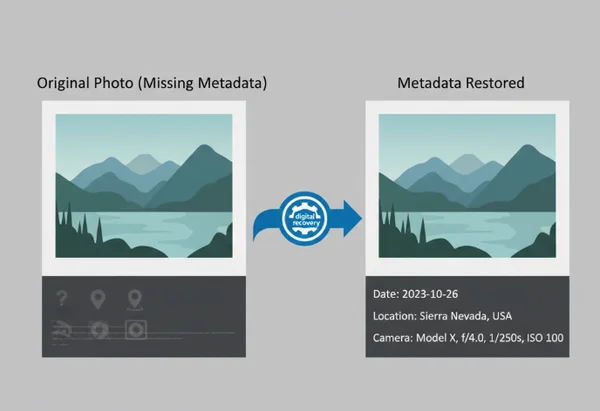
Understanding EXIF Data Loss: Causes and Prevention
To fix a problem, you must first understand why it happens. EXIF data is delicate. It lives in the "header" of your image file. If that header is rewritten or deleted, the metadata vanishes. Knowing the triggers for this loss can help you keep your digital archive intact.
Common Causes of Metadata Corruption and Loss
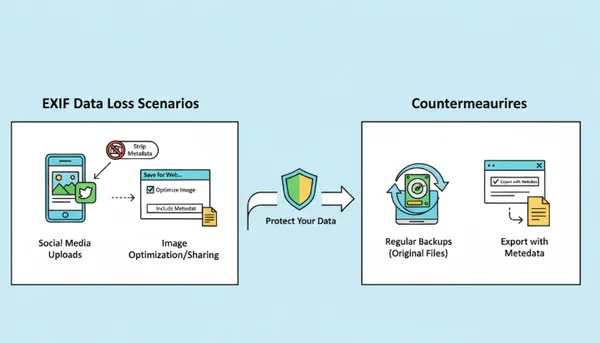
One of the biggest culprits of metadata loss is social media. Platforms like Facebook, Instagram, and WhatsApp often remove EXIF data to protect user privacy and reduce file size. If you download photos from these platforms, the original camera settings and GPS information are usually lost forever.
Another common cause is using the "Save for Web" feature in older versions of photo editing software. These tools are designed to make files as small as possible. To do this, they often remove all "non-essential" data. This includes your EXIF and IPTC information. Additionally, improper file transfers can cause issues. Pulling a memory card while it is still writing often leads to corrupted headers. This makes the metadata unreadable.
Signs That Your Photo's EXIF Data Might Be Compromised
How do you know if your metadata is actually corrupted or just hidden? One obvious sign is the "Date Modified" field. If your computer shows a date much later than when you took the photo, check the "Date Taken" field. If that field is blank, the EXIF header has likely been stripped.
Other signs include the absence of camera model information or lens settings in your editing software. Sometimes, a file might not open in professional programs like Adobe Lightroom but will work in a basic web browser. This often indicates a technical error in the file's metadata segment. To be sure, you should check exif online to see if a specialized reader can still find the data bits.
Proactive Steps to Prevent Metadata Loss Before It Happens
Prevention is always better than recovery. To keep your metadata safe, always keep the original "master" files on a secure backup drive. When transferring photos, use a reliable cable or a high-quality card reader. Avoid sending them through wireless apps that might compress the files and strip data.
If you use editing software, look for export settings that preserve data. Select options like "Keep All Metadata" during the process. Also, consider using "Sidecar" files, such as .XMP files. These files store your metadata separately from the image. This provides an extra layer of safety if the main image file becomes corrupted.
EXIF Data Recovery Methods: From Simple to Advanced
If you realize your data is missing, do not panic. Depending on how the data was lost, there are several levels of recovery you can attempt.
Built-in Camera and Software Solutions
The first place to look is your original camera backup. Many modern cameras store a secondary log of shots taken. If you still have the original memory card, you may have options. Even if you deleted the photo, professional file recovery software might bring back the original file with the metadata intact.
Check your professional software like Adobe Bridge or Lightroom. Sometimes these programs "remember" the metadata even if the file on the disk has been modified. They use a cache to store this information. You can often use a "Synchronize Metadata" command. This writes that cached information back into the file header.
Using Specialized Metadata Recovery Tools
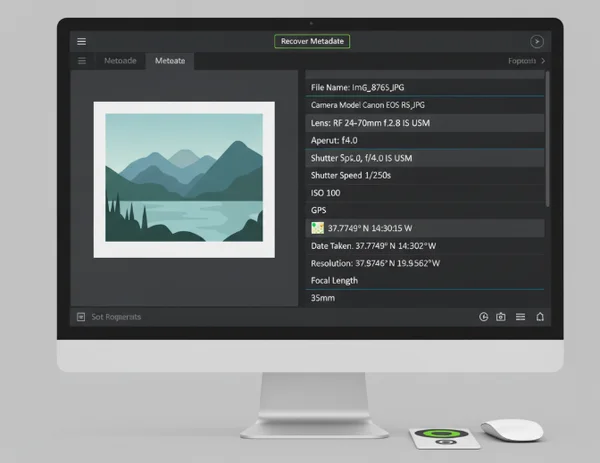
When standard software fails, you need a specialized metadata reader. These tools are designed to look deep into the binary code of the image. They can often find "MakerNotes." This is proprietary data added by manufacturers like Canon, Nikon, or Sony that general file explorers often ignore.
Many of these tools are available online, but you must be careful about your privacy. Use a tool that processes the image locally in your browser. This ensures that your high-resolution images are never uploaded to a random server. You can analyze your photos using these types of secure, browser-based tools. This helps you see if the technical data segments are still recoverable.
Professional Recovery Services: When to Consider Them
For high-stakes situations, you might need professional digital forensics. Examples include legal disputes or a once-in-a-lifetime wedding shoot. Professional services can reconstruct damaged file headers bit by bit. This is expensive and usually only necessary if the physical storage device is broken. If the file opens but just lacks data, software-based recovery is usually sufficient.
Step-by-Step Guide to Salvaging Metadata with EXIFData.org
If you suspect your photo still contains hidden details, follow this simple process to check and salvage what you can.
Initial Assessment: Determining If Recovery Is Possible
Start by gathering the files you are worried about. Compare the file sizes. If a file that should be 10MB is suddenly 500KB, it has been compressed. In this case, the metadata is likely gone. However, if the file size is still large, there is hope. The data might just be "unsupported" by your current operating system.
At this stage, you need a tool that supports a wide range of formats. This includes HEIC, TIFF, and various RAW formats. Using a broad-spectrum tool allows you to extract photo details that your standard computer software might be skipping over.
Leveraging Browser-Based Recovery for Maximum Privacy
Privacy is a major concern when dealing with personal or client photos. Many online "EXIF viewers" require you to upload your files to their servers. This can be a security risk. Instead, use a tool that uses a script to read the data directly in your browser.
Because the image never leaves your computer, you can safely check sensitive photos. Simply drag and drop your image into the tool. It will immediately parse the EXIF, IPTC, and XMP blocks. If the data exists in any of these standard formats, the tool will display it. You will see a clean, readable list. You can then copy the settings back into your metadata editor.
Alternative Recovery Methods When Online Tools Fall Short
If a browser-based tool shows absolutely nothing, the metadata has likely been "zeroed out." In this case, your last hope is to look for "duplicates" on cloud storage. Check services like Google Photos or iCloud. These services often save a version of the photo with metadata. This is true even if the version on your phone was stripped by an app like Discord or Slack.
Case Studies: Real Metadata Recovery Success Stories
To understand how these tools work in the real world, let's look at three common scenarios where users successfully salvaged their data.
Wedding Photographer Recovers Essential Client Data
Alex, a professional wedding photographer, accidentally exported a gallery of 500 images using a "Clear Metadata" preset. He had already deleted the original RAW files from his working drive to save space. By using a deep-scan metadata viewer, he was able to confirm that the "MakerNotes" were still embedded in the JPEGs. He used this information to manually reconstruct the shooting log. This saved his professional reputation.
Travel Blogger Restores Location Information From Corrupted Files
Chloe is a travel blogger who relies on GPS tags to map her journeys. After a folder of her photos became "read-only" due to a disk error, her mapping software couldn't read the locations. She used a browser-based tool to read metadata now and found the GPS coordinates were still there. She simply copied the coordinates into her blog's map tool. This allowed her to bypass the file error entirely.
Digital Archivist Salvages Historical Photo Metadata
An archivist working with scanned TIFF files noticed that the IPTC descriptions were not appearing. These descriptions contained the history of the photos. By analyzing the files with a dedicated metadata reader, they discovered a format issue. The data was stored in an older XMP format that the database didn't recognize. They were able to export the data and convert it to a modern format. This successfully preserved the history of the collection.
Taking Action: Your Next Steps in Protecting and Recovering Photo Metadata
Final thoughts: When you lose your photo's metadata, it can feel like losing a piece of history. But with the right approach, this data doesn't have to be gone forever. By understanding the causes of data loss, you can take steps to protect your future work. Always keep original backups and use sidecar files when possible.
If you find yourself with a "blank" photo, remember that the data might just be hidden. It might be stored in a way your computer doesn't understand. Before giving up, always use a dedicated, privacy-focused tool to scan the file header.
We invite you to use our tool today to check the health of your photos. Whether you are a professional or a casual user, knowing what is inside your images is important. It is the first step toward better digital security and organization.
The Takeaway
Can all types of EXIF data be recovered from damaged photos?
Not always. If the data has been intentionally "stripped," it cannot be recovered from that specific file. This happens when the bits are overwritten with zeros. However, if the data is merely "corrupted" or in an unsupported format, a high-quality viewer can often find and display it.
Is it possible to recover metadata from formatted memory cards?
Yes, provided you have not written new data over the card. You can use file recovery software to restore the entire image file. Once the file is restored, you can verify your data to see if the EXIF information stayed intact during the recovery process.
What's the difference between file recovery and metadata recovery?
File recovery is about bringing back a deleted or lost file from a storage device. Metadata recovery is about finding and reading the hidden information inside a file you already have. Metadata recovery is often much simpler. It does not require complex disk scanning.
Are there risks involved in attempting metadata recovery myself?
If you use a tool that modifies the file, there is a small risk of making the file unreadable. This is why we recommend using a "viewer-first" approach. By using a browser-based viewer, you are only reading the data. You are not changing it. This is 100% safe for your original files.
How can I tell if a recovery tool is trustworthy?
A trustworthy tool will never ask you to "upload" your files to a server if the task can be done locally. It should also have a clear privacy policy. Tools that process data in your browser are the safest option. They never touch your original file on the disk; they only read a copy in the computer's memory.